


Prompt-to-video tools promise to translate simple text inputs into finished social video ads. After evaluating InVideo AI over three months to create vertical social ads and YouTube pre-rolls, we share our campaign metrics, workflow speed, and honest verdict.

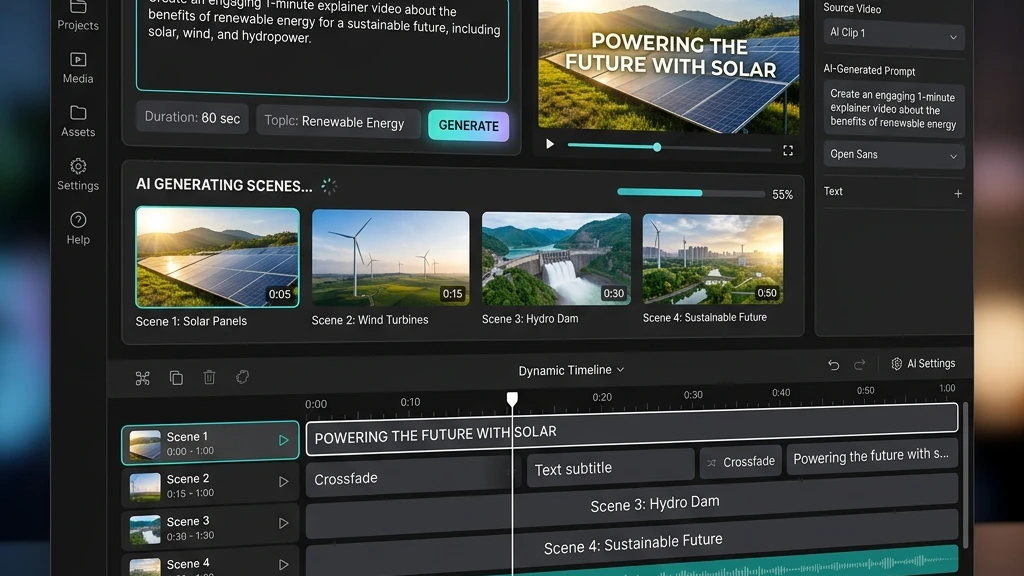
Unlike traditional editors that require importing visual assets or choosing layout templates, InVideo AI functions largely like a conversation: you write a prompt specifying the topic, target platform, tone, and pacing, and the AI automatically writes a script, chooses stock clips, generates a voiceover, and renders a fully edited video.
But does this prompt-centric workflow create creatives that actually drive advertising conversions, or is the output too generic for competitive paid social grids? As part of our evaluation of the best AI video ad generators, we put the tool through its paces to find out.
What is InVideo AI?
InVideo AI is a browser-based artificial intelligence video editor that utilizes natural language processing to generate videos. You do not edit by sliding tracks on a timeline; instead, you write text instructions (e.g. “change voiceover to a British male”, “replace the background clip with a modern kitchen”, “make the pacing faster”) and the AI adjusts the output.
The platform is optimized for social formats (9:16 vertical, 1:1 square, and 16:9 landscape) and includes automatic scripting, synthetic voice generation, stock clip matching, and auto-subtitling, making it a very convenient choice for rapid creative prototyping.
Key features & capabilities
We evaluated the core assets of InVideo AI:
- Prompt-to-Video Workflow: Generates a script, voiceover, stock visuals, and layout simply from a 2-sentence description.
- Text-Command Video Editor: Refine edits by writing directions directly in the chat input rather than manually slicing timelines.
- AI Voice Library: Access to realistic synthetic voice models with natural inflection in multiple languages.
- Stock Asset Matching: Automatically matches script segments to stock clips from iStock, Storyblocks, and Shutterstock.
Detailed pros and cons
✅ What we loved
- Lowest learning barrier to entry of all tools tested
- Excellent prompt interpreter writing strong scripts automatically
- Great for quickly testing multiple visual angles and concepts
- Text-command editing works surprisingly well for basic changes
- Generates ready-to-use social clips in under 10 minutes
❌ Areas for improvement
- Fine-grained timeline control is constrained and feels clumsy
- Stock clip matches can feel repetitive or too generic
- No native performance analysis or conversion scoring features
- Watermarked rendering on lower-tier subscription models
Pricing & plans in 2026
InVideo AI pricing is structured on a monthly subscription with video export credits:
| Plan Tier | Price / Month | Best For | Core Features Included |
|---|---|---|---|
| Free | $0 | Testing & Prototyping | Watermarked exports, limited stock assets, no voice clone |
| Plus Recommended | $25 / mo | Social Advertisers | 50 mins of video exports/mo, no watermarks, unlimited stock media |
| Max | $48 / mo | Agencies & Creators | 200 mins of exports/mo, 10 team seats, priority rendering support |
Who is InVideo AI best for?
👤 Solopreneurs & Affiliates
Ideal for creating rapid social video concepts and explainer ads with zero design resources or editing experience.
📱 Social Media Managers
Great for producing high volumes of quick vertical reels, YouTube shorts, or TikTok clips directly from simple text topic ideas.
🏢 Agencies Prototyping
Use the prompt generator to create initial video drafts and mockups rapidly before committing production or studio budgets.